adminer数据库zblog meta字段数据库可视化编辑油猴脚本
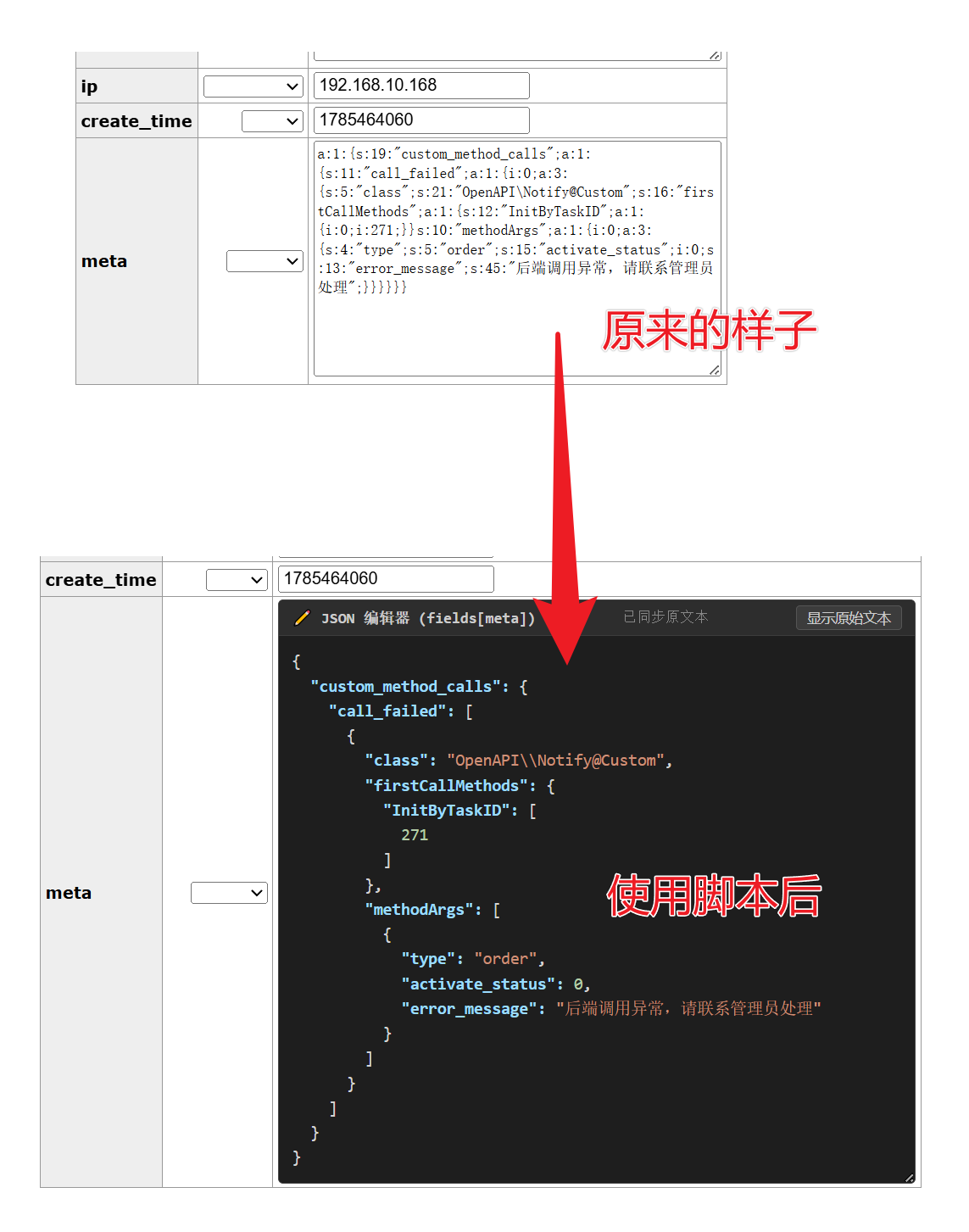
受够了zblog使用的php数组序列化方法,有时候想手动修改一下数据很不方便,看也不方便看,就一坨在那,现在有了这个插件后可以用json方式查看,还可以对json修改,修改实时序列化后同步到原内容。
看效果:👇
使用方法:👇
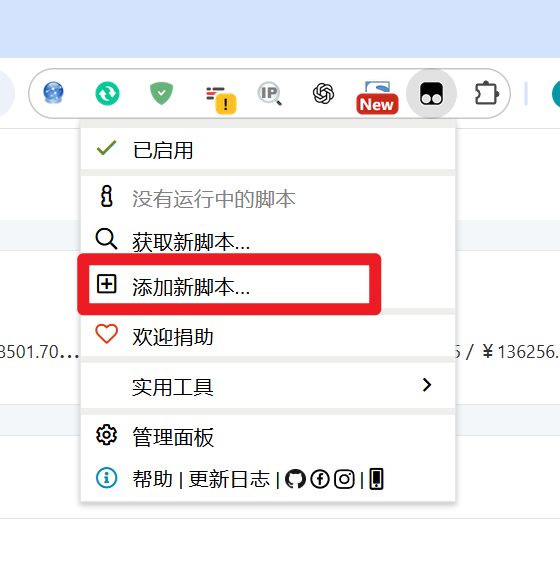
浏览器安装油猴脚本,然后添加新脚本,复制下面的代码后保存就行了。so easy!!
脚本代码:👇
// ==UserScript==
// @name Adminer PHP Serialize 元数据 JSON 美化与双向实时编辑器
// @namespace https://kfuu.cn/
// @version 1.0
// @description 高亮 JSON 可编辑并实时反序列化同步写回原始 textarea
// @author kfuu.cn
// @match *://*/*adminer*
// @grant none
// ==/UserScript==
(function () {
'use strict';
// ==========================================
// 1. PHP Unserialize (字节流解码)
// ==========================================
function phpUnserialize(dataStr) {
const encoder = new TextEncoder();
const decoder = new TextDecoder('utf-8');
const bytes = encoder.encode(dataStr);
let offset = 0;
function readUntil(sepByte) {
let start = offset;
while (offset < bytes.length && bytes[offset] !== sepByte) offset++;
if (offset >= bytes.length) throw new Error("Unexpected end of data");
let str = decoder.decode(bytes.subarray(start, offset));
offset++;
return str;
}
function readBytes(len) {
if (offset + len > bytes.length) throw new Error("Out of bounds");
let sub = bytes.subarray(offset, offset + len);
offset += len;
return decoder.decode(sub);
}
function parse() {
if (offset >= bytes.length) return null;
let type = String.fromCharCode(bytes[offset]);
offset += 2;
switch (type) {
case 'i':
case 'd':
case 'b': {
let val = readUntil(59);
return type === 'b' ? val === '1' : Number(val);
}
case 's': {
let len = parseInt(readUntil(58), 10);
offset++;
let str = readBytes(len);
offset += 2;
return str;
}
case 'a': {
let count = parseInt(readUntil(58), 10);
offset++;
let obj = {};
let isArray = true;
for (let i = 0; i < count; i++) {
let k = parse();
let v = parse();
if (k !== i) isArray = false;
obj[k] = v;
}
offset++;
if (isArray) {
let arr = [];
for (let i = 0; i < count; i++) arr.push(obj[i]);
return arr;
}
return obj;
}
case 'N': return null;
default: return null;
}
}
try {
return parse();
} catch (e) {
return null;
}
}
// ==========================================
// 2. PHP Serialize (JS 对象转 PHP 序列化字符串)
// ==========================================
function phpSerialize(val) {
const encoder = new TextEncoder();
function getByteLength(str) {
return encoder.encode(str).length;
}
function serialize(item) {
if (item === null || item === undefined) {
return 'N;';
}
if (typeof item === 'boolean') {
return `b:${item ? 1 : 0};`;
}
if (typeof item === 'number') {
if (Number.isInteger(item)) {
return `i:${item};`;
}
return `d:${item};`;
}
if (typeof item === 'string') {
return `s:${getByteLength(item)}:"${item}";`;
}
if (typeof item === 'object') {
let keys = Object.keys(item);
let isArr = Array.isArray(item);
let result = `a:${keys.length}:{`;
if (isArr) {
item.forEach((v, i) => {
result += serialize(i) + serialize(v);
});
} else {
for (let k in item) {
if (Object.prototype.hasOwnProperty.call(item, k)) {
let intKey = parseInt(k, 10);
if (!isNaN(intKey) && intKey.toString() === k) {
result += serialize(intKey);
} else {
result += serialize(k);
}
result += serialize(item[k]);
}
}
}
result += '}';
return result;
}
return 'N;';
}
return serialize(val);
}
// ==========================================
// 3. 高亮辅助函数
// ==========================================
function highlightJson(json) {
if (typeof json !== 'string') {
json = JSON.stringify(json, null, 2);
}
json = escapeHtml(json);
return json.replace(/("(\u[a-zA-Z0-9]{4}|\[^u]|[^\"])*"(\s*:)?|\b(true|false|null)\b|-?\d+(?:\.\d*)?(?:[eE][+\-]?\d+)?)/g, function (match) {
let cls = 'json-number';
if (/^"/.test(match)) {
if (/:$/.test(match)) {
cls = 'json-key';
} else {
cls = 'json-string';
}
} else if (/true|false/.test(match)) {
cls = 'json-boolean';
} else if (/null/.test(match)) {
cls = 'json-null';
}
return `<span class="${cls}">${match}</span>`;
});
}
function escapeHtml(str) {
return str.replace(/&/g, "&").replace(/</g, "<").replace(/>/g, ">");
}
// ==========================================
// 4. 主逻辑
// ==========================================
function init() {
const nameRegex = /^fields\[.*meta.*\]$/i;
const textareas = document.querySelectorAll('textarea');
textareas.forEach(textarea => {
const nameAttr = textarea.getAttribute('name');
if (!nameAttr || !nameRegex.test(nameAttr)) return;
if (textarea.dataset.jsonBeautified) return;
textarea.dataset.jsonBeautified = 'true';
const td = textarea.closest('td');
if (!td) return;
// 高度优先按原本框高度,拿不到就默认 220px
const rect = textarea.getBoundingClientRect();
const targetHeight = rect.height > 50 ? rect.height + 'px' : (textarea.offsetHeight ? textarea.offsetHeight + 'px' : '220px');
const rawData = textarea.value.trim();
let parsedData = rawData ? phpUnserialize(rawData) : null;
let formattedHtml = '';
if (parsedData !== null) {
formattedHtml = highlightJson(parsedData);
} else if (rawData) {
formattedHtml = `<span class="json-error">【解析失败】非标准 PHP Serialize 格式</span>`;
} else {
formattedHtml = `<span class="json-null">{}</span>`;
}
textarea.style.display = 'none';
// 构建 overlay,宽度写死 450px
const overlay = document.createElement('div');
overlay.className = 'meta-json-overlay';
overlay.style.width = '450px';
overlay.style.height = targetHeight;
overlay.innerHTML = `
<div class="overlay-header">
<span class="overlay-title">✏️ JSON 编辑器 (${escapeHtml(nameAttr)})</span>
<span class="status-tip">已同步原文本</span>
<button class="overlay-btn toggle-btn">显示原始文本</button>
</div>
<div class="overlay-content"><code contenteditable="true" spellcheck="false">${formattedHtml}</code></div>
`;
injectStyles();
td.appendChild(overlay);
const toggleBtn = overlay.querySelector('.toggle-btn');
const contentDiv = overlay.querySelector('.overlay-content');
const editableCode = overlay.querySelector('code[contenteditable]');
const statusTip = overlay.querySelector('.status-tip');
let showRaw = false;
// 实时编辑 & 双向同步
let syncTimer = null;
editableCode.addEventListener('input', () => {
if (syncTimer) clearTimeout(syncTimer);
syncTimer = setTimeout(() => {
const text = editableCode.innerText;
try {
const jsonObj = JSON.parse(text);
const phpSerializedString = phpSerialize(jsonObj);
textarea.value = phpSerializedString;
textarea.dispatchEvent(new Event('input', { bubbles: true }));
textarea.dispatchEvent(new Event('change', { bubbles: true }));
statusTip.textContent = "✓ 已实时同步到原文本框";
statusTip.className = "status-tip success";
} catch (err) {
statusTip.textContent = "❌ JSON 格式错误 (未同步)";
statusTip.className = "status-tip error";
}
}, 300);
});
// 切换原始文本模式
toggleBtn.addEventListener('click', (e) => {
e.preventDefault();
showRaw = !showRaw;
if (showRaw) {
contentDiv.style.display = 'none';
overlay.style.height = 'auto';
textarea.style.display = 'block';
toggleBtn.textContent = '切回 JSON 视图';
} else {
const latestRaw = textarea.value.trim();
let latestParsed = latestRaw ? phpUnserialize(latestRaw) : null;
if (latestParsed !== null) {
editableCode.innerHTML = highlightJson(latestParsed);
statusTip.textContent = "已同步原文本";
statusTip.className = "status-tip";
}
textarea.style.display = 'none';
contentDiv.style.display = 'block';
overlay.style.height = targetHeight;
toggleBtn.textContent = '显示原始文本';
}
});
});
}
// ==========================================
// 5. CSS 样式
// ==========================================
function injectStyles() {
if (document.getElementById('meta-json-styles')) return;
const style = document.createElement('style');
style.id = 'meta-json-styles';
style.textContent = `
.meta-json-overlay {
background: #1e1e1e !important;
color: #d4d4d4 !important;
border: 1px solid #454545;
border-radius: 4px;
display: flex;
flex-direction: column;
font-family: Consolas, Monaco, "Courier New", monospace !important;
box-sizing: border-box;
overflow: hidden;
resize: both;
}
.overlay-header {
background: #2d2d2d;
padding: 4px 10px;
display: flex;
justify-content: space-between;
align-items: center;
border-bottom: 1px solid #3c3c3c;
font-size: 12px;
flex-shrink: 0;
}
.overlay-title {
color: #cccccc;
font-weight: 600;
}
.status-tip {
font-size: 11px;
color: #888888;
transition: color 0.2s;
}
.status-tip.success {
color: #4ec9b0;
}
.status-tip.error {
color: #f48771;
font-weight: bold;
}
.overlay-btn {
background: #3c3c3c;
color: #cccccc;
border: 1px solid #555555;
padding: 2px 8px;
border-radius: 3px;
cursor: pointer;
font-size: 11px;
transition: all 0.2s;
}
.overlay-btn:hover {
background: #0e639c;
color: #ffffff;
border-color: #1177bb;
}
.overlay-content {
margin: 0 !important;
padding: 10px !important;
flex: 1;
overflow: auto;
font-size: 13px !important;
line-height: 1.5 !important;
background: #1e1e1e !important;
}
.overlay-content code {
background: transparent !important;
color: inherit !important;
padding: 0 !important;
border: none !important;
font-family: inherit !important;
white-space: pre-wrap !important;
word-break: break-all !important;
outline: none !important;
display: block;
min-height: 100%;
}
.json-key { color: #9cdcfe !important; font-weight: bold; }
.json-string { color: #ce9178 !important; }
.json-number { color: #b5cea8 !important; }
.json-boolean { color: #569cd6 !important; }
.json-null { color: #569cd6 !important; }
.json-error { color: #f48771 !important; }
`;
document.head.appendChild(style);
}
init();
const observer = new MutationObserver(init);
observer.observe(document.body, { childList: true, subtree: true });
})();